Welcome to Mayer Lutheran
Let’s get your accounts, your laptop and your phone set up. Work down the list at whatever speed suits you.

on your phone
On a computer too? Go to new.mayerlutheran.org.
- Tick things off as you go. This page remembers where you got to, even if you close it.
- Some people will figure this out faster than others. If you get through it quickly, help out your neighbour.
- Every link opens in a new tab so you never lose this page.
- Stuck? Raise your hand and skip it. Come back to it later — don’t sit there being stuck. That’s what the helpers are here for.
Start here
Five things, in this order. Don't skip ahead — each one needs the one before it.
- 1 min
You’ll know it worked: You're holding a card with your name, email, and passwords.
You cannot do anything else on this list until you have it. If you don't have one, raise your hand now rather than waiting.
Note: Take a photo of it on your phone. Cards get lost — a picture on your phone is the version you'll still have in a month. Then put the card somewhere you'll remember.
- 3 min
You’ll know it worked: You can load a website — try mayerlutheran.org.
MLHS Guest is just to get you online. The very next section moves you onto the real student network — but you need the internet first to set that up, so start here.
Show me how
Windows
- Click the Wi-Fi icon in the bottom-right corner, near the clock.
- Click the arrow (>) next to the Wi-Fi symbol to see the list of networks.
- Pick MLHS Guest and click Connect.
- If a page opens asking you to accept terms, accept it.
Mac
- Click the Wi-Fi icon in the top-right menu bar.
- Pick MLHS Guest from the list.
- If a page opens asking you to accept terms, accept it.
Chromebook
- Click the clock in the bottom-right corner.
- Click the Wi-Fi button, then pick MLHS Guest.
- If a page opens asking you to accept terms, accept it.
It's not working
- No networks listed at all? Wi-Fi is switched off. On a laptop there's often a physical key for it — look along the F1–F12 row for a little antenna symbol and press it (you may need to hold Fn).
- Says connected but nothing loads? Open a browser and go to any website. Guest networks usually wait for you to open a page before they let you through.
- Asks for a password? You picked the wrong network. MLHS Guest doesn't need one. Go back and check the name.
- 2 min
You’ll know it worked: You see a page titled 'Mayer Lutheran Student Portal' with a row of app icons.
The Student Portal is the front door to everything — grades, email, files, classes. If you only remember one link from today, this is the one.
Open mayerlutheran.org (opens in a new tab)Then: Students → M365 Student Portal

Students → M365 Student Portal 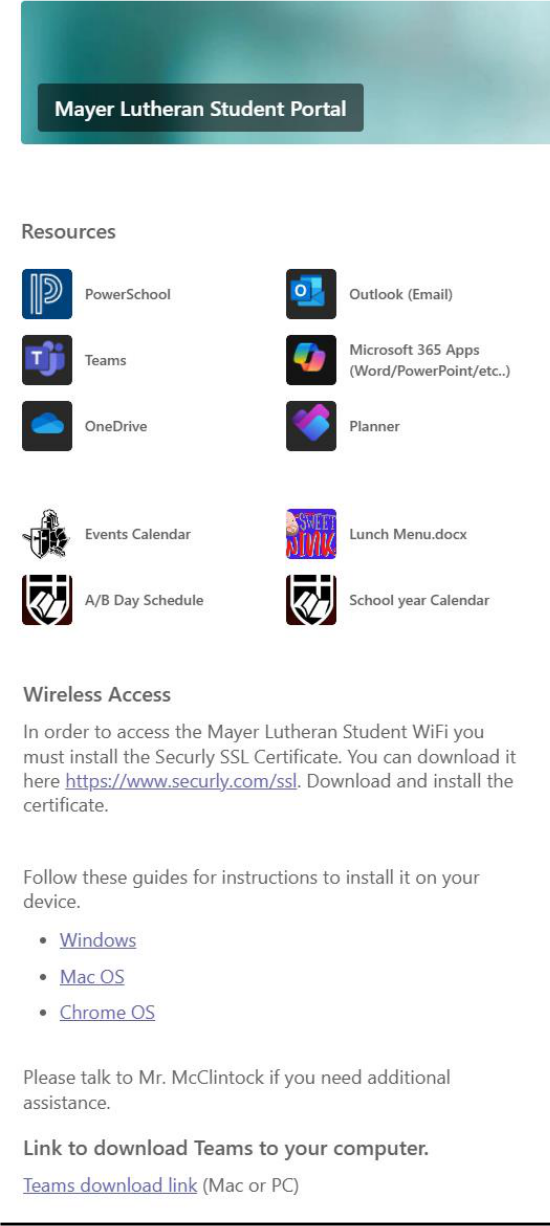
This is what you should be looking at. Note: It will ask you to sign in with your Microsoft account. That's the next box down — go and do that one, then come back here.
- 3 min
You’ll know it worked: Your initials or photo appear in the top-right corner of the portal.
Your email address is firstname.lastname@mayerlutheran.org — your full first and last name, with a dot between them, exactly as the school spells it.
Note: Type the whole email address including
@mayerlutheran.org. Just the first part won't work.It's not working
- "We couldn't find an account" — check your spelling, especially if your legal first name is longer than the name you go by. Alexander, not Alex.
- "Your password is incorrect" — passwords are case-sensitive and the letter O and the number 0 look almost identical on that card. Try it once more slowly, then raise your hand rather than locking yourself out.
- It signed in as someone else's account — the browser remembered a previous account. Click the account picture in the top right, sign out, and sign in again with your address.
- It's asking for a personal Microsoft account password — see the note below about personal accounts.
If you already have a Microsoft account
Some of you already sign in to Microsoft for Xbox, Minecraft, or an old Hotmail or Outlook.com address. That account is not this account. They look identical on the sign-in screen and this trips up more people than anything else on this page.
If you end up saving schoolwork into your personal account, your teachers can't see it and it won't be there when you need to turn it in. Check the top-right corner: it should say your
@mayerlutheran.orgaddress. - 2 min
You’ll know it worked: You can close the tab, click your bookmark, and land back on the portal.
Do this now, while the portal is still on screen.
Show me how
Windows
- With the portal open, press Ctrl + D.
- Where it says Folder, choose Bookmarks bar (Chrome) or Favorites bar (Edge) so it's always visible.
- Change the name to something short like
Portal, then click Done. - Don't see a bar under the address box? Press Ctrl + Shift + B to turn it on.
Mac
- With the portal open, press ⌘ + D.
- Choose Favourites Bar / Bookmarks Bar so it's always visible.
- Change the name to something short like
Portal, then click Done or Add. - Don't see a bar under the address box? Press ⌘ + Shift + B.
Chromebook
- With the portal open, press Ctrl + D.
- Choose Bookmarks bar in the Folder box.
- Change the name to something short like
Portal, then click Done. - Don't see a bar under the address box? Press Ctrl + Shift + B.
Better than a bookmark: open it automatically
You can make the portal open by itself every time you start your browser, so you never have to remember it at all.
- Open your browser's Settings.
- Find On startup (Chrome/Edge) or General → Homepage (Safari/Firefox).
- Choose Open a specific page, and paste the portal address.
Good to know: Bookmark this checklist too — it keeps your checkmarks, and the 'At home' section at the bottom is waiting for you tonight.
The school Wi-Fi certificate
The fiddliest thing on the list and different on every device — so it's early, while there's plenty of help in the room. Come to the help desk; don't fight it alone.
- 10 min
You’ll know it worked: You can load a secure site on MLHS Students without a red warning.
Note: Bring your laptop to the help desk for this one. It needs your computer's admin password and it goes differently on every machine. There is no prize for struggling through it by yourself.
Chromebook
Careful: On a Chromebook, plan on asking for help with this one. The certificate settings are buried several menus deep, and if your Chromebook is managed by a school or a parent you may not be allowed to install it at all. Get in the help queue rather than hunting through Settings on your own — this is the expected way to do it, not a last resort.
Open securly.com/ssl (opens in a new tab)Download the certificate from here first
What am I installing, and why?
School networks are legally required to filter what students can reach. Filtering an encrypted connection means the filter has to sit in the middle of it, and your computer will refuse to trust anything in the middle unless you tell it to. The certificate is you telling it to.
It only applies on the school network. It does not let the school see your home internet, and it doesn't do anything on your phone's cell data.
The steps for your computer
Windows
- Download the certificate file from securly.com/ssl.
- Double-click the downloaded file.
- Click Install Certificate.
- Choose Local Machine and click Next. It will ask for an admin password.
- Choose Place all certificates in the following store, click Browse, and pick Trusted Root Certification Authorities.
- Click Next, then Finish, and accept the security warning.
Careful: Using Firefox? Firefox keeps its own separate list and ignores the one you just did. It needs importing a second time inside Firefox's own settings. Tell the helper you use Firefox.
Mac
- Download the certificate file from securly.com/ssl.
- Open Keychain Access (press ⌘+Space and type it).
- Drag the downloaded file into the System keychain.
- Enter your Mac's admin password when asked.
- Find the certificate in the list and double-click it.
- Expand Trust, and set When using this certificate to Always Trust.
- Close the window — it asks for your password once more to save.
Careful: You need the password you use to install software on this Mac. If it's a family computer and you don't know it, you'll need a parent — get the rest of your list done today and come back to this one.
Chromebook
- Download the certificate file from securly.com/ssl.
- Open Settings → Privacy and security → Security.
- Click Manage certificates.
- Open the Authorities tab and click Import.
- Pick the downloaded file.
- Tick Trust this certificate for identifying websites, then OK.
Note: ⚠ The Student Portal also has step-by-step guides with pictures for Windows, Mac, and Chrome OS under Wireless Access.
- 3 min
You’ll know it worked: Websites load normally with no certificate warnings.
Now swap off MLHS Guest and onto MLHS Students, the same way you connected this morning.
Good to know: This checklist keeps working while you switch networks — your ticks are saved on your own device, not on a server.
- 2 min
The first time you open a website on the student network, a page may ask for your school email and password. That's expected — sign in.
Careful: But be careful about that habit. Real sign-in requests happen when you just connected to the school network. A login box that appears out of nowhere, in an email, or on a site you didn't expect is how accounts get stolen. When in doubt, don't type your password — ask.
Your two logins
You have two separate accounts. They look similar and they are not the same. Two minutes here saves you a dozen headaches later.
- 2 min
You’ll know it worked: You can say out loud what each account is for.
Microsoft 365 — sign in with your full email
firstname.lastname@mayerlutheran.org. This is email, files, Teams, Word. Nearly everything.PowerSchool — sign in with just
firstname.lastname, no @mayerlutheran.org, and a different password. This is grades, attendance, missing work, and your lunch balance. That's all it does.Careful: Same username, different password, different website. When something says "wrong password", check which of the two you're actually on before you try again.
- 3 min
You’ll know it worked: You can see your class schedule and your lunch balance.
Open PowerSchool (opens in a new tab)Username is firstname.lastname — no @mayerlutheran.org
Have a look around. Your grades will be empty today.
What you'll actually use this for
Grades and missing assignments — this is the honest list of what you owe. Check it on Fridays, not on the last day of the quarter.
Your lunch balance. When it runs low, this is where you find out before it becomes awkward.
Microsoft Teams
Teams is where your classes live: what's happening this week, what's due, and how you reach your teacher.
- 5 min
You’ll know it worked: You can see a grid of your classes.
Find the T logo under Resources on the Student Portal.
Windows
Note: Open it in your browser for now. The next task installs the app, which is better.
Mac
Careful: On a Mac, use Chrome rather than Safari — Teams in Safari has a history of misbehaving around assignments. The next task installs the app, which is better still.
Chromebook
Note: On a Chromebook you use Teams in the browser — that's the normal way, and nothing is missing. Skip any instruction on this site that talks about installing the app.
It's not working
- Stuck on a loading spinner? Give it a full minute the first time — it's building your account. If it's still spinning, refresh once.
- Asking you to sign in again? Use your full
@mayerlutheran.orgemail, same as the portal. - "You're missing out! Ask your admin to enable Teams." — you're signed in with a personal Microsoft account, not your school one. Sign out and sign back in.
- 10 min
You’ll know it worked: Teams opens from your Start menu or Applications folder, not just a browser tab.
Windows
The installed app is faster than the browser version, and notifications actually reach you.
Mac
The installed app is faster than the browser version, and notifications actually reach you. On a Mac it also avoids Safari, which has a history of misbehaving with assignments.
Chromebook
Good to know: Nothing to install on a Chromebook — Teams in the browser is the normal way and nothing is missing. Tick this one and move on.
Note: If it won't install here, use Teams in your browser for today and finish this at home.
- 2 min
You’ll know it worked: You can count your classes and they match your schedule.
Click Teams in the left-hand bar. Every class you're in is a tile here.
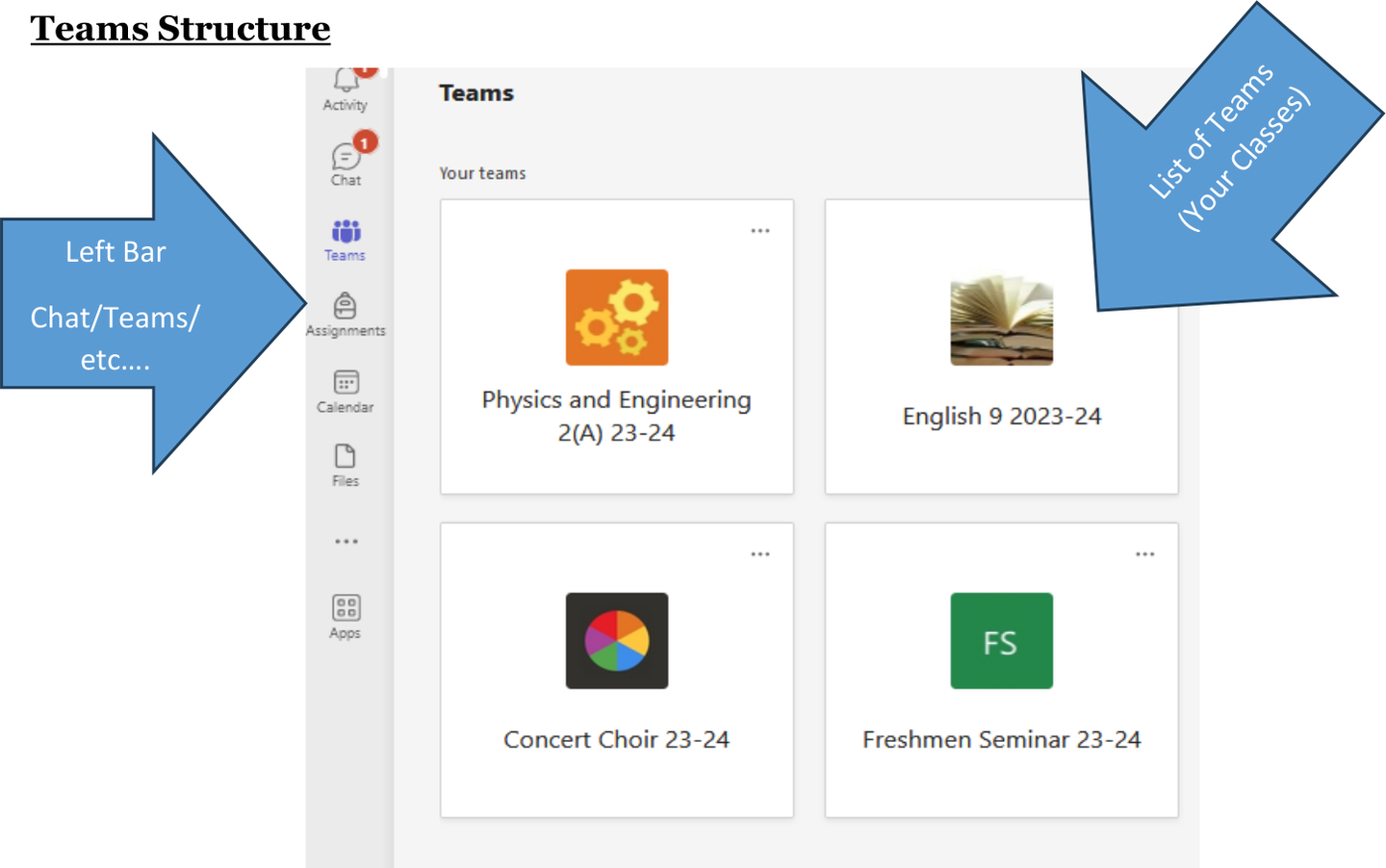
One tile per class. Note: A class missing? Don't panic — rosters move around in the first week.
- 3 min
You’ll know it worked: You're looking at a plan with days of the week on it.
Open the 2026 Test Team, then find Weekly Plan along the top of the page.
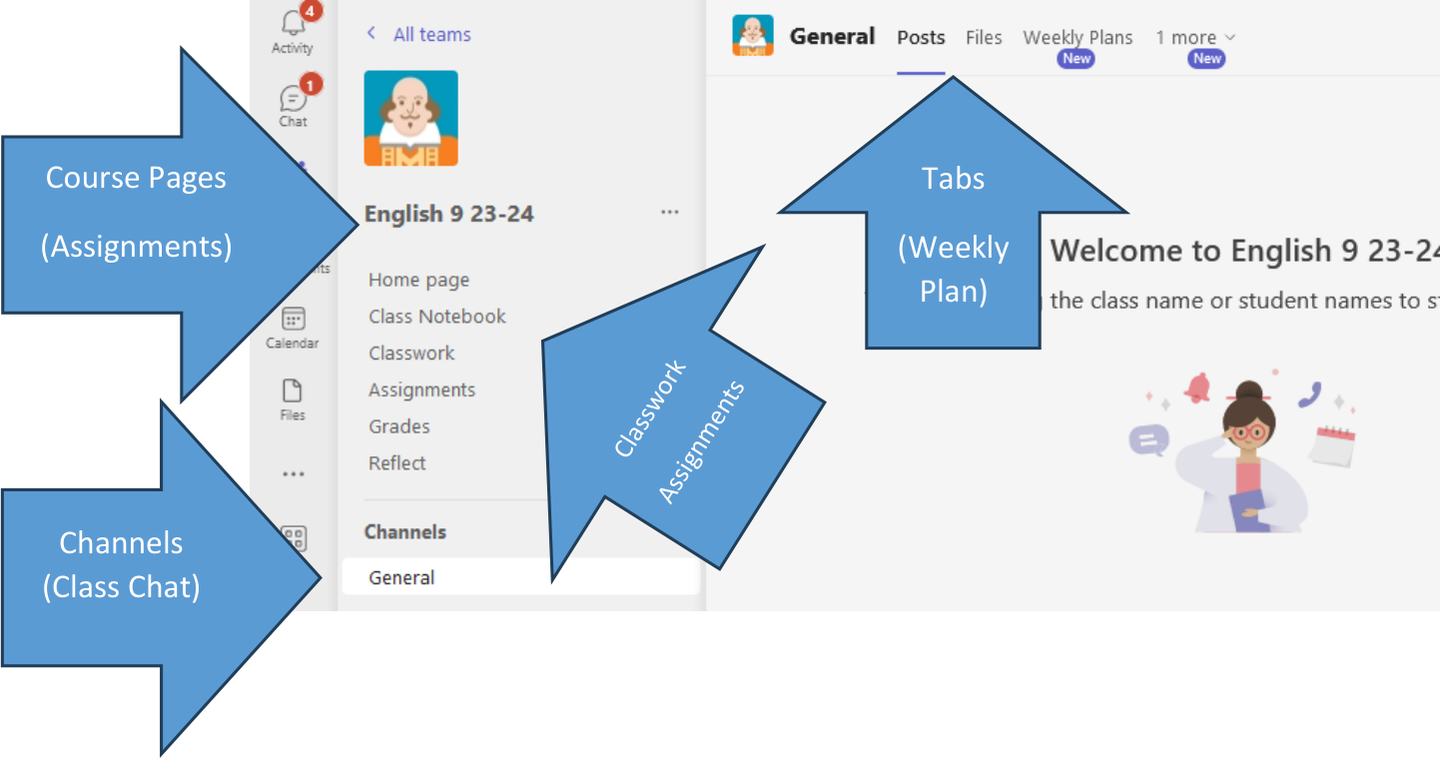
The four parts of every class page. Weekly Plan is a tab along the top. Good to know: This is the most useful page in Teams. Every class posts one. If you're absent, sick, or you just zoned out — the Weekly Plan is the first place you look, before you email anyone.
- 8 min
You’ll know it worked: The assignment moves to your Completed list and shows 'Turned in'.
In 2026 Test Team, click Assignments and open the practice one. This is the exact process you'll use for every real assignment all year, so it's worth doing slowly.
Show me how
- Open the assignment and read the instructions.
- Click the Word document attached under My work. It opens straight in your browser.
- Answer the question. It saves as you type — there is no Save button and you don't need one.
- Click Close in the top-right of the document to come back to the assignment.
- Click Turn in.
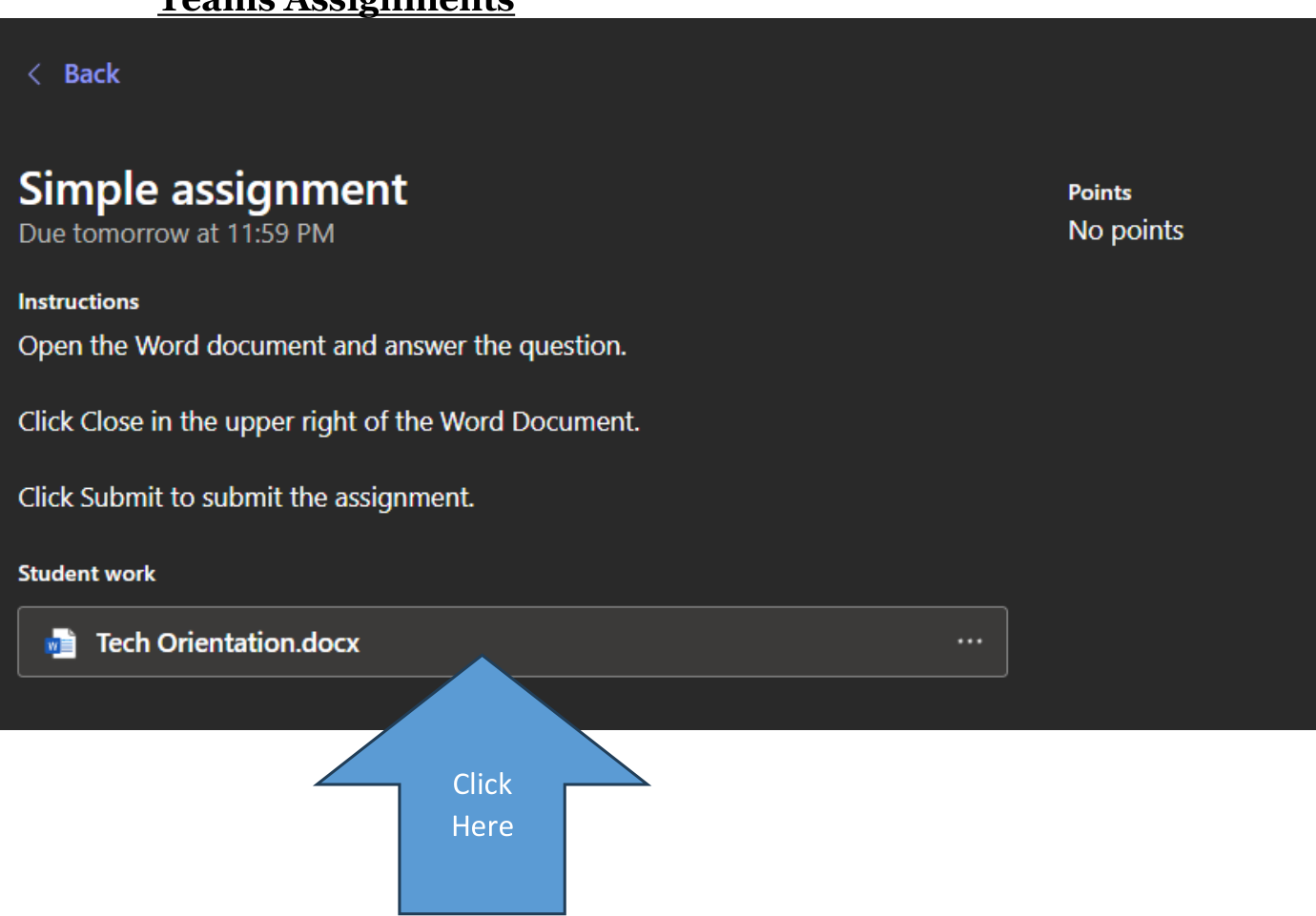
Close the document first, then Turn in. Careful: Writing in the document is not the same as turning it in. Work you never turned in looks the same as work you never did, so it is worth checking every time.
It's not working
- No Turn in button? You're still inside the document. Close it first.
- *Button says Undo turn in?* You already did it. You're finished.
- Document won't open? Try once more; if it still won't, raise your hand — don't sit and wait.
- 3 min
You’ll know it worked: Your message appears in the conversation with a sent tick.
- Click Chat in the top-left of Teams.
- Start a new chat and search for Matt McClintock.
- Tell me which class you're looking forward to most, and why.
When to chat a teacher vs. email them
Chat is for quick and now — "I can't find the assignment", "I'll be late to your class".
Email is for anything that needs a record or a real answer — absences, extensions, questions about a grade.
Either way: teachers are not on call at 11pm. Send it anyway if that's when you thought of it, but expect the reply in the morning.
Email, files, and printing
Where your work lives, and how to get it out of the computer.
- 6 min
You’ll know it worked: I'll reply to you. No reply by tomorrow means it never sent.
Open Outlook from the same Student Portal, and email matt.mcclintock@mayerlutheran.org.
Note: Before you send it, read the box below. You'll write a few hundred emails to teachers over the next four years and this is the whole skill.
How to email a teacher (read this one)
- Put something real in the subject line. "Question about Friday's quiz" — not blank, not "hey".
- Start with a greeting. "Hi Mr. McClintock," is plenty.
- Say what you need in the first sentence. Teachers read a lot of email on a phone between classes.
- Sign your name. Your address has your name in it, but sign it anyway — and if you're emailing a teacher who has 90 students, say which class you're in.
- Read it once before sending. That's it.
Not required, just true: the students who write clear emails get faster and more helpful answers. Every time.
It's not working
- Can't find Outlook? It's on the Student Portal under Resources, with the blue envelope icon.
- Bounced back? Check the address spelling —
matt.mcclintock@mayerlutheran.org, two dots. - Sent it from a personal Gmail? Send it again from your school account. That's the one that counts.
- 6 min
You’ll know it worked: Your OneDrive has one folder per class, named clearly.
- Open OneDrive from the Student Portal.
- Click the + button, then Folder.
- Name it after the class. Do one for each class — you don't need one for study hall.
Why bother, when the computer has a Desktop?
Anything in OneDrive is on every device you sign into, backed up, and recoverable when you delete it by accident. Anything on your Desktop exists in exactly one place and is one spilled drink away from gone.
Laptops break and get left at home. Anything saved here is still there when that happens, on any computer you can sign in from.
- 8 min
You’ll know it worked: A blue cloud appears near your clock (Windows) or in the menu bar (Mac), and a OneDrive folder shows up in your file browser.
Windows
This puts your school files in a normal folder on your computer, so you can open and save them without going to a website every time. It also means your work is backed up automatically.
- Open OneDrive from the Student Portal.
- Click the gear icon in the top right.
- Click Sync this OneDrive.
- Your browser will ask something like “Open Microsoft OneDrive?” — click Open. That's expected.
- Sign in with your school email address if it asks.
- Accept the folder location it offers and click Next through the setup.
- Open File Explorer — there'll be a OneDrive - Mayer Lutheran folder in the sidebar. Same files you just saw in the browser.

Gear icon → Sync this OneDrive Careful: If OneDrive is already signed in as somebody else — a parent, or your own personal Microsoft account — don't sign them out. Open OneDrive's settings, go to Account, and choose Add an account. It can run both at once.
Mac
This puts your school files in a normal folder on your Mac, so you can open and save them without going to a website every time. It also means your work is backed up automatically.
Note: First: install OneDrive from the App Store if it isn't there already. Unlike Windows, a Mac doesn't come with it.
- Open OneDrive from the Student Portal.
- Click the gear icon in the top right.
- Click Sync this OneDrive.
- Your browser will ask something like “Open Microsoft OneDrive?” — click Open. That's expected.
- Sign in with your school email address if it asks.
- Accept the folder location it offers and click through the setup.
- Open Finder — there'll be a OneDrive - Mayer Lutheran folder in the sidebar. Same files you just saw in the browser.
Gear icon → Sync this OneDrive Careful: If OneDrive is already signed in as somebody else — a parent, or your own personal Microsoft account — don't sign them out. Open OneDrive's settings, go to Account, and choose Add an account. It can run both at once.
Chromebook
Good to know: Nothing to do on a Chromebook — your files already live online, which is exactly what this step sets up on other computers. Tick it and move on.
Note: This one can take a while and needs a decent connection. If it stalls, tick the rest of the list and finish this at home tonight.
It's not working
- Nothing happened when you clicked Sync this OneDrive — the browser prompt may have been blocked. Look for a small icon at the right-hand end of the address bar, or just open the OneDrive app on your computer directly and sign in with your school email. Same result.
- It asks for a personal Microsoft account — you picked the wrong sign-in. Use your
@mayerlutheran.orgaddress. - It wants to back up your Desktop, Documents and Pictures — on a family computer, say no for now and ask a helper. On your own computer it's fine either way.
- It's still syncing after ten minutes — that's normal on a busy network. Leave it running and carry on with the list.
- 8 min
You’ll know it worked: The file is inside your Freshman Seminar folder, named My Classes, with your name in it.
Make a Word document in your Freshman Seminar folder called My Classes.
Put your name at the top, then answer: What's your favourite class, and why? What's your least favourite, and why?
Note: There's no Save button and that's not a mistake — it saves every few seconds by itself. Watch the top of the window and you'll see it say Saved.
- 4 min
You’ll know it worked: You can see the STEM printer in the list on the Cloud Printing page.
You don't install a printer at school. Printing goes through CrusaderWorks, which means it works from anywhere — a classroom, home, your phone.
- Go to the Student Portal and find the link to CrusaderWorks.
- Once it opens, look down the left-hand side and click Tools.
- Click Cloud Printing.
- Look at the list of printers, and check you can see the STEM printer.
Careful: Don't actually print anything today. All we want is for you to find this page and confirm the printer shows up.
Why check it now if I'm not printing?
Because the moment you actually need this, it'll be five minutes before class and the thing will be due. Finding out today that you can reach the page — and that the printer is there — costs you thirty seconds. Finding out then costs you the assignment.
It's not working
- Can't find CrusaderWorks on the portal? Ask — it's there, but it isn't always where you'd expect.
- It asks you to sign in? Use your school email, same as everything else today.
- No printers listed, or no STEM printer? Tell Mr. McClintock. That's a real problem worth finding now, and it's exactly why we're checking.
Your phone
Four apps. This is how you'll actually check things during the year, whatever you think right now.
- 4 min
You’ll know it worked: You can see your schedule on your phone.
Careful: The app asks for a District Code before anything else. Ours is LCWG.
Which phone do you have?
Showing iPhone steps.Showing Android steps.Sign in with
firstname.lastnameand your PowerSchool password — the second one on your card, not your email password. - 3 min
You’ll know it worked: You can see your classes on your phone.
Which phone do you have?
Showing iPhone steps.Showing Android steps.Sign in with your school email. If it offers you a personal account you already have, say no and use the school one.
- 3 min
You’ll know it worked: Your school email arrives on your phone.
Which phone do you have?
Showing iPhone steps.Showing Android steps.Note: Outlook splits your mail into Focused and Other. Real school email lands in Focused. Check Other every so often anyway — it guesses wrong sometimes.
- Go further4 min
Useful for reading a document on the bus, or photographing something and dropping it straight into a class folder.
Which phone do you have?
Showing iPhone steps.Showing Android steps.
Class accounts
- 5 min
You’ll know it worked: You can log out and back in again with your new password.
The sign-up link lives in CrusaderWorks, under Tools — the same place as Cloud Printing.
- Open CrusaderWorks from the Student Portal.
- Click Tools in the left-hand menu.
- Find the typing link and open it.
- Sign up using your school email address.
Important: Use a different password than your school password. Your school password opens your email, your files, and your grades. It should never be typed into a website that isn't the school's — not this one, not any of them. If a site ever gets broken into, the password you used there is the password someone tries everywhere else.
So what password should I use?
Pick three random words and a number —
otter-piano-lamp7. Long beats complicated: it's far harder to crack thanXk9!pand you can actually remember it.Write it on the same card as your school passwords and keep the card somewhere sensible. Written on paper at home is genuinely fine. Reused across ten websites is not.
Worth knowing
- 3 min
You should hear this straight rather than find it out later.
- Your school email and Teams chats are school accounts. They're retained, and staff can access them when there's a reason to.
- Web browsing on the school network is filtered and logged. That's a legal requirement for schools, not a Mayer Lutheran quirk.
- Files in your school OneDrive live in the school's system.
- Your personal phone on cell data is yours. None of the above applies to it.
Note: No one is sitting and reading your messages. But a school account isn't private the way a text to a friend is, and it is worth knowing which is which. The short version: don't put anything in a school account you'd be uncomfortable explaining.
- 2 min
Forgotten password is the number one thing students need all year, and it's an easy fix — but only if you ask. Don't spend three days locked out.
- Find Mr. McClintock — email
matt.mcclintock@mayerlutheran.org, a Teams chat, or come and find me. - Bring the device with the problem if you can. "It says an error" is hard to fix from a description.
- Ask early. A broken login the morning something is due is a much worse problem than the same broken login three days before.
- Find Mr. McClintock — email
Finished early?
Nothing here is required. Pick whatever looks useful — and the first one genuinely helps.
- Go further10 min
Look along your row for someone stuck on something you've already finished, and help them. Don't take their laptop and do it for them — tell them where to click.
Good to know: This is the most useful thing a fast finisher can do today, and you'll understand it better for having explained it.
- Go further10 min
Go through your class list in Teams one at a time and find the Weekly Plan in each one. Teachers lay their pages out a little differently, so it's worth seeing all of them once.
Good to know: This is the page you'll want the day you come back from being sick. Much easier to find it now than to go hunting for it then.
- Go further5 min
In Outlook: Settings → Mail → Compose and reply. Something simple — your name, your graduating class year. It gets added to every email you send.
- Go further5 min
The Events Calendar and the A/B Day Schedule are both on the Student Portal. Knowing whether tomorrow is an A day or a B day is a surprisingly large quality-of-life upgrade.
- Go further5 min
Windows
- Ctrl + S — save (harmless everywhere, essential in apps that don't autosave)
- Ctrl + Z — undo, including things you thought were unrecoverable
- Ctrl + F — find a word on the page. Stop scrolling for it.
- Alt + Tab — switch between open windows
- Ctrl + Shift + T — reopen the tab you just closed by accident
Mac
- ⌘ + S — save
- ⌘ + Z — undo
- ⌘ + F — find a word on the page
- ⌘ + Tab — switch between open apps
- ⌘ + Shift + T — reopen the tab you just closed by accident
Chromebook
- Ctrl + F — find a word on the page
- Ctrl + Z — undo
- Alt + Tab — switch between windows
- Ctrl + Shift + T — reopen the tab you just closed
- Search + 5 — screenshot
At home
Not today — tonight or this weekend, somewhere with time and a charger. Your ticks are saved, so come back to this page and finish the list.
- At home30 min
You’ll know it worked: Word opens from your Start menu / Applications folder.
Windows
- Go to the Student Portal and click Microsoft 365 Apps.
- Click Install apps at the top right.
- Run the downloaded installer and leave the computer on — it takes a while.
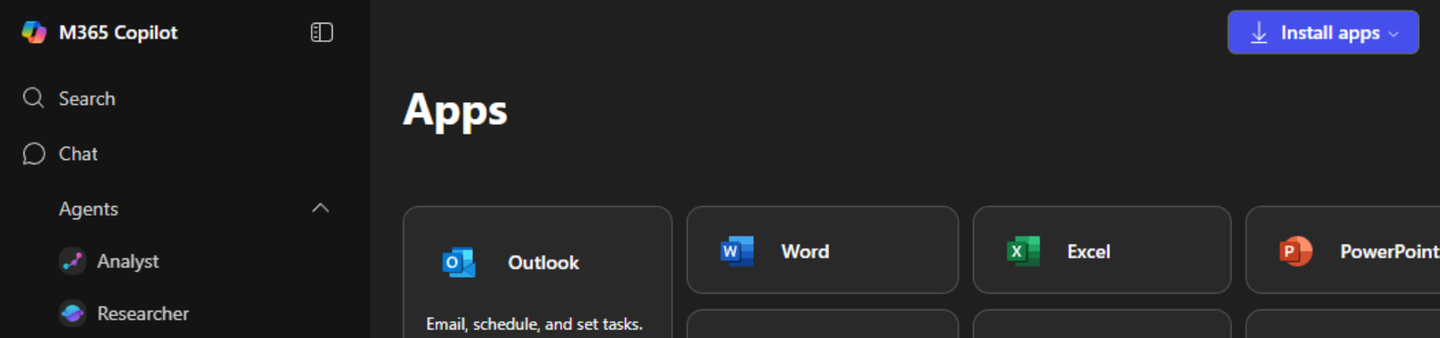
Install apps, top right. Mac
- Go to the Student Portal and click Microsoft 365 Apps.
- Click Install apps at the top right.
- Open the downloaded installer and follow it. You'll need your Mac's admin password.
Install apps, top right. Chromebook
Good to know: Nothing to install — Chromebooks run Word in the browser and you already have it. Skip this one; it's genuinely done.
- At home1 min
Your laptop needs to last a whole school day. Put your charger in your bag tonight.